Teaching Approaches/Adapting and sharing resources: Difference between revisions
SimonKnight (talk | contribs) |
SimonKnight (talk | contribs) No edit summary |
||
| (20 intermediate revisions by the same user not shown) | |||
| Line 1: | Line 1: | ||
=Introduction to OER, Creative Commons, and Open Government Licence= | =Introduction to OER, Creative Commons, and Open Government Licence= | ||
The WikiEducator's OER Handbook http://wikieducator.org/OER_Handbook is an invaluable resource for exploring the use of Open Educational Resources. We have drawn on it here for our purposes (as marked below), but the interested reader may wish to delve more into the original resource. | |||
See | ==Defining OER== | ||
The term "Open Educational Resource(s)" (OER) refers to educational resources (lesson plans, quizzes, syllabi, instructional modules, simulations, etc.) that are freely available for use, reuse, adaptation, and sharing. In contrast, Open Educational Practices (OEP) involve the processes that create an educational environment where OER are used as learning resources. OEP focuses on the approaches that are used to support the "demand side of education and not so much on the supply side" (OER) (Blackall & Hegarty, 2011). An openness to collaboration, sharing, networking and creating an online identity are some of the characteristics required to practice in this environment. | |||
The term "open educational resources" was first used in July 2002 during a UNESCO workshop on open courseware in developing countries (Johnstone, 2005). Most definitions of the term include content, software tools, licenses, and best practices. OER is a burgeoning field of practice and exploration as evidenced by the growing number of research studies including the OECD (2007), OLCOS (2007), and Hewlett Foundation (Atkins, Brown and Hammond, 2007) reports. There is an emerging research community gaining momentum and focusing on investigating the impact of OER on learning and the education environment. {{adaptedfrom|http://wikieducator.org/OER_Handbook/educator/Introduction/Defining_OER|whole}} | |||
==Why OER== | |||
{{adaptedfrom|Wikieducator|DefiningOER|With OER you are free to | |||
* Reuse - Use the work verbatim (unaltered), without having to ask | |||
* Revise - Alter or transform the work to meet your | |||
* Remix - Combine the (verbatim or altered) work with other works for enhanced | |||
* Redistribute - Share the verbatim, reworked, or remixed work with others. | |||
(Wiley, 2007)}} | |||
==Creative Commons and Open Government Licence== | |||
Many OER are have a Creative Commons licence. There are a number of variants of 'CC' licences, but crucially all the free distribution of the licensed work without needing to seek permissions (in most cases, as long as attribution to the source is maintained). Some licences do not allow 'remixing' or 'revising' and are thus less suitable for OER, but in most OER a more flexible licence which allows 'derivatives' is assigned, leaving the user free to modify the resource as they wish. See the Creative Commons website for more detail http://creativecommons.org/about. | |||
The Open Government Licence is a UK inititiatve to licence all Crown Copyright (and other Governmental) works under a licence similar to the Creative Commons licence (available http://www.nationalarchives.gov.uk/doc/open-government-licence/ ). In addition, most materials in the National Archives are now under an OGL licence, meaning they may be remixed, and reused - as we have done in many places on this wiki. | |||
=Adapting and Sharing our Resources= | =Adapting and Sharing our Resources= | ||
{{adaptedfrom|TESSA Working With Teachers|SharingPractice|''' | {{adaptedfrom|TESSA Working With Teachers|SharingPractice|'''How can you deepen your engagement with the ORBIT community and others involved in working with teachers in an open educational resource (OER) environment? | ||
The ORBIT materials are OERs. This means that they can be freely shared, adapted and used by anyone. | The ORBIT materials are OERs. This means that they can be freely shared, adapted and used by anyone. | ||
You might start with the community closest to you – in your own context. If you are a teacher educator working in a college or university, these questions might help | You might start with the community closest to you – in your own context. If you are a teacher educator working in a college or university, these questions might help | ||
* To what extent do teacher educators at my institution work together? | * To what extent do teacher educators at my institution work together? | ||
* How could I benefit from increasing this collaboration? | * How could I benefit from increasing this collaboration? | ||
| Line 19: | Line 35: | ||
* How can you share your ORBIT experiences with others who work with teachers in schools and in your local community? | * How can you share your ORBIT experiences with others who work with teachers in schools and in your local community? | ||
You could use the following steps for selecting and preparing to use ORBIT activities in the curriculum | You could use the following steps for selecting and preparing to use ORBIT activities in the curriculum | ||
# Select an appropriate theme or teaching approach that you’ve identified as needing attention, or which is on your curriculum/scheme of work for the next few weeks – this might be one which you find particularly challenging to teach, one which your learners have struggled with or a new way of teaching that you want to try out. | # Select an appropriate theme or teaching approach that you’ve identified as needing attention, or which is on your curriculum/scheme of work for the next few weeks – this might be one which you find particularly challenging to teach, one which your learners have struggled with or a new way of teaching that you want to try out. | ||
# Locate and review relevant ORBIT materials to identify suitable sections which match your chosen theme, topic or skill. | # Locate and review relevant ORBIT materials to identify suitable sections which match your chosen theme, topic or skill. | ||
| Line 31: | Line 47: | ||
=Copyright= | =Copyright= | ||
==How to Stay Within the Law== | ==How to Stay Within the Law== | ||
{{adaptedfrom|Copyright: | {{adaptedfrom|Copyright: keep it legal/Resource|CopyrightWithinTheLaw|Everyone has favourite websites they use to find information. When you use these sources to find useful-looking material, apart from making sure that it is of good quality, you also need to take account of the conditions surrounding its use. Simply being on the web does not make something freely available to use in all circumstances. Intellectual Property Rights (IPR), of which copyright is just one part (along with Patents, Designs and Trademarks) protect the creators of ideas. Materials that are in some way ‘fixed’ like text, music, pictures, sound recordings and web pages, are protected by the Copyright, Designs and Patents Act 1988 and may often have an accompanying symbol (©) and/or legal statement. | ||
In most circumstances, works protected by copyright can only be used – and ‘used’ can mean copied, scanned, distributed, stored, adapted, broadcasted or shown - in whole or in part with the permission of the owner. You are personally responsible if you use material without having the necessary permissions and could face prosecution and a hefty fine. You also have a moral duty to act as a good role model to the students in your care in order to help them recognise the importance of keeping legal. | In most circumstances, works protected by copyright can only be used – and ‘used’ can mean copied, scanned, distributed, stored, adapted, broadcasted or shown - in whole or in part with the permission of the owner. You are personally responsible if you use material without having the necessary permissions and could face prosecution and a hefty fine. You also have a moral duty to act as a good role model to the students in your care in order to help them recognise the importance of keeping legal. | ||
| Line 37: | Line 53: | ||
In some cases, obtaining this permission results in a fee being charged and obtaining permission can be time consuming. Our focus within this course is on identifying resources that you can use free of charge and don’t need to seek further permission to use. However, in order to be able to do that you need to know a little more about copyright.}} | In some cases, obtaining this permission results in a fee being charged and obtaining permission can be time consuming. Our focus within this course is on identifying resources that you can use free of charge and don’t need to seek further permission to use. However, in order to be able to do that you need to know a little more about copyright.}} | ||
{{adaptedfrom|Copyright: | {{adaptedfrom|Copyright: keep it legal/Resource|CopyrightPractical|Look at these examples of material, which are readily available on the web. For each item note down answers to the following question | ||
* What copyright information can you find out about it? | * What copyright information can you find out about it? | ||
* What can you ‘do’, legally, with this information, in terms of re-using it? | * What can you ‘do’, legally, with this information, in terms of re-using it? | ||
# [http://www.teachers.tv/video/45811 A video about combustion. ][http://www.tes.co.uk/teaching-resource/Secondary-Science-Using-ICT-Investigating-Combustion-with-Year-7-Using-Gas-Sensors-6084454/ http://www.tes.co.uk/teaching-resource/Secondary-Science-Using-ICT-Investigating-Combustion-with-Year-7-Using-Gas-Sensors-6084454/][http://www.teachers.tv/video/45811 | # [http://www.teachers.tv/video/45811 A video about combustion. ][http://www.tes.co.uk/teaching-resource/Secondary-Science-Using-ICT-Investigating-Combustion-with-Year-7-Using-Gas-Sensors-6084454/ http://www.tes.co.uk/teaching-resource/Secondary-Science-Using-ICT-Investigating-Combustion-with-Year-7-Using-Gas-Sensors-6084454/][http://www.teachers.tv/video/45811] | ||
# [http://www.bloggersbase.com/travel/uluru-a-natural-icon/ An article about Uluru], including text and pictures. (use [http://nature.new7wonders.com/archives/wonder/uluru http://nature.new7wonders.com/archives/wonder/uluru] ) | # [http://www.bloggersbase.com/travel/uluru-a-natural-icon/ An article about Uluru], including text and pictures. (use [http://nature.new7wonders.com/archives/wonder/uluru http://nature.new7wonders.com/archives/wonder/uluru]) | ||
Like printed materials or works of art, everything published on the web is protected by copyright, even if it looks as if it is ‘free’ information. The rules on copyright, which are already complicated, become more complex in an online world, because it is so easy to copy and transfer electronic information to other people. | Like printed materials or works of art, everything published on the web is protected by copyright, even if it looks as if it is ‘free’ information. The rules on copyright, which are already complicated, become more complex in an online world, because it is so easy to copy and transfer electronic information to other people. | ||
The bottom line on copyright is that anything you find on the web, whether text, an image, video clip or piece of audio, ‘belongs’ to someone else, and you should check the copyright statement if there is one, to ascertain what you can legally do with the material. | The bottom line on copyright is that anything you find on the web, whether text, an image, video clip or piece of audio, ‘belongs’ to someone else, and you should check the copyright statement if there is one, to ascertain what you can legally do with the material.}} | ||
The objective of this | ==Unpicking copyright== | ||
The objective of this section is to explore some of the legal guidance around copyright, and the exceptions to copyright rules. | |||
There are exceptions to the copyright rules which allow you to do a little more with material you find within your teaching than in other contexts. | There are exceptions to the copyright rules which allow you to do a little more with material you find within your teaching than in other contexts. | ||
| Line 66: | Line 80: | ||
Using material you find on the web has been made easier in recent years through Creative Commons, which provides a system of licensing to enable people to share and re-use information easily. | Using material you find on the web has been made easier in recent years through Creative Commons, which provides a system of licensing to enable people to share and re-use information easily. | ||
Play this video from Creative Commons for a brief introduction. | Play this video from Creative Commons for a brief introduction. | ||
| Line 76: | Line 85: | ||
[http://www.youtube.com/watch?v=1DKm96Ftfko A shared culture] | [http://www.youtube.com/watch?v=1DKm96Ftfko A shared culture] | ||
Now look at the Creative Commons [http://creativecommons.org/about/licenses licenses] | Now look at the Creative Commons [http://creativecommons.org/about/licenses licenses], note the increasing degrees of protection they offer for the creators of material, and also what constitutes ‘use’. Note down which of the licenses are the most useful, from your point of view. | ||
'''Discussion''' | |||
Creative Commons extends and works alongside copyright to enable people to share their work. This works well for us as consumers of information because it expands the amount of information available for us to re-use. | Creative Commons extends and works alongside copyright to enable people to share their work. This works well for us as consumers of information because it expands the amount of information available for us to re-use. | ||
'''Creative Commons: using Flickr''' | |||
Flickr is a site for sharing photographs. The advanced search options in Flickr enable you to search within Creative Commons licensed content. You can restrict your search according to what you ultimately want to do with what you find. For example, you can search just for images that you can edit. This is a quick and easy way to ensure that you find material quickly which suits your purpose. | Flickr is a site for sharing photographs. The advanced search options in Flickr enable you to search within Creative Commons licensed content. You can restrict your search according to what you ultimately want to do with what you find. For example, you can search just for images that you can edit. This is a quick and easy way to ensure that you find material quickly which suits your purpose. | ||
| Line 97: | Line 100: | ||
* Do the same search on ‘digital native’. How many items did you find this time? What you can ‘do’ with this material? | * Do the same search on ‘digital native’. How many items did you find this time? What you can ‘do’ with this material? | ||
'''Discussion ''' | |||
When we did this search, there was a significant difference in the number of hits and what we were able to ‘do’ with the content we found. Restricting the search to only those items licensed under Creative Commons reduced the number of hits from 7000+ to around 1000, and what we could do with the material found was much less restrictive. However, you do need to be careful because of the different sort of Creative Commons licences, most of which do require that you give appropriate attribution for the images you use (e.g. if you are including an image in a presentation you may also have to include the url where you found the image). | When we did this search, there was a significant difference in the number of hits and what we were able to ‘do’ with the content we found. Restricting the search to only those items licensed under Creative Commons reduced the number of hits from 7000+ to around 1000, and what we could do with the material found was much less restrictive. However, you do need to be careful because of the different sort of Creative Commons licences, most of which do require that you give appropriate attribution for the images you use (e.g. if you are including an image in a presentation you may also have to include the url where you found the image). | ||
'''Creative Commons: using Google''' | |||
Like Flickr, Google’s advanced search options enable you to filter your results according to what you ultimately want to do with what you find. | Like Flickr, Google’s advanced search options enable you to filter your results according to what you ultimately want to do with what you find. | ||
* Go to the [http://images.google.co.uk/ Google Images] website. | |||
* Go to the [http://images.google.co.uk/ Google Images] | |||
* Search for material on a topic of your choosing. Write down the search term that you are going to use. | * Search for material on a topic of your choosing. Write down the search term that you are going to use. | ||
* Now select ‘Advanced search’. Under ‘Usage rights’, note the range of options in the drop-down menu for restricting your search. | * Now select ‘Advanced search’. Under ‘Usage rights’, note the range of options in the drop-down menu for restricting your search. | ||
| Line 114: | Line 111: | ||
Click on a few of the items to look at what you can do with the material. | Click on a few of the items to look at what you can do with the material. | ||
'''Discussion''' | |||
Searching in this way is a good idea in two respects – it reduces the number of items you have to deal with and ensures that you get material which you can reuse. For example, when we did this search, using the word ‘fish’, and restricting the results to those ‘labeled for reuse’, we were able to reduce the hits on Google images from over 104 million to a more much manageable 500. | Searching in this way is a good idea in two respects – it reduces the number of items you have to deal with and ensures that you get material which you can reuse. For example, when we did this search, using the word ‘fish’, and restricting the results to those ‘labeled for reuse’, we were able to reduce the hits on Google images from over 104 million to a more much manageable 500. | ||
'''Reviewing your sources''' | |||
When looking for material to use in the classroom, using ‘reliable, high quality’ sites to start with can take some of the guesswork out of finding resources that can be re-used legally. The objective of this course activity is to revisit the sites you normally use, and review them to see whether they are good sources of legal-to-use information. | When looking for material to use in the classroom, using ‘reliable, high quality’ sites to start with can take some of the guesswork out of finding resources that can be re-used legally. The objective of this course activity is to revisit the sites you normally use, and review them to see whether they are good sources of legal-to-use information. | ||
Go to the sites that you normally use as sources of material | Go to the sites that you normally use as sources of material. Note down any information about the copyright associated with those sites. To what extent can you legally use material from them?{{adaptedfrom|Copyright: keep it legal/Resource|CopyrightPractical|}} | ||
=Wikis= | =Wikis= | ||
Learners often need space to share ideas and/or resources, to write together. This section looks at the use of a ‘wiki’ (a website which can be added to and edited by any number of people) for these purposes. | |||
So what is a wiki? A wiki is a website for sharing and developing ideas, materials, plans etc. Any page of the website can be changed by anyone (sometimes usernames and passwords are needed, sometimes edits can be anonymous). Only one person can edit any one page at one time but as soon as they have finished and saved, anyone else can then edit it. | So what is a wiki? A wiki is a website for sharing and developing ideas, materials, plans etc. Any page of the website can be changed by anyone (sometimes usernames and passwords are needed, sometimes edits can be anonymous). Only one person can edit any one page at one time but as soon as they have finished and saved, anyone else can then edit it. | ||
'''Exploring Wikis''' | |||
Wikis are gaining popularity with teachers who recognise its power as a creative and collaborative tool. Teachers are exploring ways of integrating them into their teaching and learning. Some are sharing examples of pupil work, others are encouraging pupils to contribute to a class wiki. | Wikis are gaining popularity with teachers who recognise its power as a creative and collaborative tool. Teachers are exploring ways of integrating them into their teaching and learning. Some are sharing examples of pupil work, others are encouraging pupils to contribute to a class wiki. | ||
| Line 183: | Line 132: | ||
{{:Sharing ideas - developing wikis (primary)/Resource/Table2}} | {{:Sharing ideas - developing wikis (primary)/Resource/Table2}} | ||
'''Wiki Structure''' | |||
'''Thinking about structure''' <br /> Wikis, like any other website can have different structures to suit different contexts. These range from a single web page to a series of linked web pages both of which can be edited by individuals or groups of people. | |||
Wikis, like any other website can have different structures to suit different contexts. These range from a single web page to a series of linked web pages both of which can be edited by individuals or groups of people. | |||
The structure of any wiki used in a learning context may well be derived from the way in which learning is structured in classrooms with groups and tasks represented by different wiki pages. On the other hand the use of a wiki allows for learning and sharing to go on over time, not constrained by ‘the lesson or session’, and to go on over space not constrained by the physical buildings. | The structure of any wiki used in a learning context may well be derived from the way in which learning is structured in classrooms with groups and tasks represented by different wiki pages. On the other hand the use of a wiki allows for learning and sharing to go on over time, not constrained by ‘the lesson or session’, and to go on over space not constrained by the physical buildings. | ||
| Line 206: | Line 153: | ||
By looking at other examples of wikis and seeing what other people are doing and thinking about how to use wikis, you will be able to generate ideas about how you might structure and use a wiki to suit your own context. | By looking at other examples of wikis and seeing what other people are doing and thinking about how to use wikis, you will be able to generate ideas about how you might structure and use a wiki to suit your own context. | ||
'''Further Reading''' | |||
You might like to look at these further resources | You might like to look at these further resources | ||
* ‘[http://www.vital.ac.uk/community/mod/resource/view.php?id=1205&direct=1 Collaborative learning the wiki way’] Engström and Jewett (2005) - available [[file:Collaborative learning the wiki way.pdf| here]] | * ‘[http://www.vital.ac.uk/community/mod/resource/view.php?id=1205&direct=1 Collaborative learning the wiki way’] Engström and Jewett (2005) - available [[file:Collaborative learning the wiki way.pdf| here]] | ||
* [http://www.vital.ac.uk/community/mod/resource/view.php?id=1209&direct=1 ‘The potential of wikis in the classroom’] Fountain (2005) - available [[file:The potential of wikis in the classroom.doc| here]] | * [http://www.vital.ac.uk/community/mod/resource/view.php?id=1209&direct=1 ‘The potential of wikis in the classroom’] Fountain (2005) - available [[file:The potential of wikis in the classroom.doc| here]] | ||
* [http://www.vital.ac.uk/community/mod/resource/view.php?id=1206&direct=1 ‘The good, the bad and the wiki’] Wheeler, Yeomans and Wheeler (2008) - available [[file:The good, the bad and the wiki.doc| here]] | * [http://www.vital.ac.uk/community/mod/resource/view.php?id=1206&direct=1 ‘The good, the bad and the wiki’] Wheeler, Yeomans and Wheeler (2008) - available [[file:The good, the bad and the wiki.doc| here]] | ||
* [http://www.vital.ac.uk/community/mod/resource/view.php?id=1207&direct=1 ‘A five stage model for the use of a wiki’] Wheeler (2008) - available [[file:A five stage model for the use of a wiki.doc| here]]}} | * [http://www.vital.ac.uk/community/mod/resource/view.php?id=1207&direct=1 ‘A five stage model for the use of a wiki’] Wheeler (2008) - available [[file:A five stage model for the use of a wiki.doc| here]]. <br/> <br/> You might also want to explore the VITAL resources on wikis.{{adaptedfrom|Sharing ideas - developing wikis (primary)/Resource|Whole|}} | ||
{{adaptedfrom|Learning together introducing wikis/Resource|BECTA|In 2008, Becta published the results of a study of the use of Web 2.0 tools in Key Stage 3 and 4 classrooms. You can access this report [[file:Becta report.pdf|here]], or in editable (.doc) format [[file:Becta report.doc|here]]. This is a lengthy report covering all aspects of Web 2.0 tools (including social networking and blogging) but there are some sections that focus on the use of wikis.Go to page 20 of the report for statistics relating to teacher perceptions of wikis and experiences of their use in the classroom. Reflect on the final bullet point that relates to use of wikis and their management. Think about whether wiki management could be an issue for you and your learners and how you might deal with this, for example, creating wikis for smaller groups and introducing a code of conduct. Add to your notes from the previous activities any further thoughts arising from your reading. | {{adaptedfrom|Learning together introducing wikis/Resource|BECTA|In 2008, Becta published the results of a study of the use of Web 2.0 tools in Key Stage 3 and 4 classrooms. You can access this report [[file:Becta report.pdf|here]], or in editable (.doc) format [[file:Becta report.doc|here]]. This is a lengthy report covering all aspects of Web 2.0 tools (including social networking and blogging) but there are some sections that focus on the use of wikis.Go to page 20 of the report for statistics relating to teacher perceptions of wikis and experiences of their use in the classroom. Reflect on the final bullet point that relates to use of wikis and their management. Think about whether wiki management could be an issue for you and your learners and how you might deal with this, for example, creating wikis for smaller groups and introducing a code of conduct. Add to your notes from the previous activities any further thoughts arising from your reading. | ||
Go to page 34 and read the section that considers the issues of private versus collaborative learning. An important point is made here about some learners who prefer their own private space for learning and therefore find it difficult to engage in collaborative activities. Reflect on whether any of your learners may have this preference and could find collaboration through a wiki to be difficult. Could you encourage such learners to become involved by careful selection of a small group of students to work on a wiki-based activity? Again, add any thoughts you have to your notes.}} | Go to page 34 and read the section that considers the issues of private versus collaborative learning. An important point is made here about some learners who prefer their own private space for learning and therefore find it difficult to engage in collaborative activities. Reflect on whether any of your learners may have this preference and could find collaboration through a wiki to be difficult. Could you encourage such learners to become involved by careful selection of a small group of students to work on a wiki-based activity? Again, add any thoughts you have to your notes.}} | ||
Latest revision as of 15:15, 13 October 2012
Introduction to OER, Creative Commons, and Open Government Licence
The WikiEducator's OER Handbook http://wikieducator.org/OER_Handbook is an invaluable resource for exploring the use of Open Educational Resources. We have drawn on it here for our purposes (as marked below), but the interested reader may wish to delve more into the original resource.
Defining OER
The term "Open Educational Resource(s)" (OER) refers to educational resources (lesson plans, quizzes, syllabi, instructional modules, simulations, etc.) that are freely available for use, reuse, adaptation, and sharing. In contrast, Open Educational Practices (OEP) involve the processes that create an educational environment where OER are used as learning resources. OEP focuses on the approaches that are used to support the "demand side of education and not so much on the supply side" (OER) (Blackall & Hegarty, 2011). An openness to collaboration, sharing, networking and creating an online identity are some of the characteristics required to practice in this environment.
The term "open educational resources" was first used in July 2002 during a UNESCO workshop on open courseware in developing countries (Johnstone, 2005). Most definitions of the term include content, software tools, licenses, and best practices. OER is a burgeoning field of practice and exploration as evidenced by the growing number of research studies including the OECD (2007), OLCOS (2007), and Hewlett Foundation (Atkins, Brown and Hammond, 2007) reports. There is an emerging research community gaining momentum and focusing on investigating the impact of OER on learning and the education environment. {{{3}}} (Adapted from [[1]], section whole).
Why OER
With OER you are free to
- Reuse - Use the work verbatim (unaltered), without having to ask
- Revise - Alter or transform the work to meet your
- Remix - Combine the (verbatim or altered) work with other works for enhanced
- Redistribute - Share the verbatim, reworked, or remixed work with others.
(Wiley, 2007) (Adapted from Wikieducator, section DefiningOER).
Creative Commons and Open Government Licence
Many OER are have a Creative Commons licence. There are a number of variants of 'CC' licences, but crucially all the free distribution of the licensed work without needing to seek permissions (in most cases, as long as attribution to the source is maintained). Some licences do not allow 'remixing' or 'revising' and are thus less suitable for OER, but in most OER a more flexible licence which allows 'derivatives' is assigned, leaving the user free to modify the resource as they wish. See the Creative Commons website for more detail http://creativecommons.org/about.
The Open Government Licence is a UK inititiatve to licence all Crown Copyright (and other Governmental) works under a licence similar to the Creative Commons licence (available http://www.nationalarchives.gov.uk/doc/open-government-licence/ ). In addition, most materials in the National Archives are now under an OGL licence, meaning they may be remixed, and reused - as we have done in many places on this wiki.
Adapting and Sharing our Resources
How can you deepen your engagement with the ORBIT community and others involved in working with teachers in an open educational resource (OER) environment?
The ORBIT materials are OERs. This means that they can be freely shared, adapted and used by anyone.
You might start with the community closest to you – in your own context. If you are a teacher educator working in a college or university, these questions might help
- To what extent do teacher educators at my institution work together?
- How could I benefit from increasing this collaboration?
- Am I personally prepared to put the effort into working together?
- How can I start a conversation about how to do this?
Teacher development may start in an institution, but schools and communities are involved as well.
- How can you share your ORBIT experiences with others who work with teachers in schools and in your local community?
You could use the following steps for selecting and preparing to use ORBIT activities in the curriculum
- Select an appropriate theme or teaching approach that you’ve identified as needing attention, or which is on your curriculum/scheme of work for the next few weeks – this might be one which you find particularly challenging to teach, one which your learners have struggled with or a new way of teaching that you want to try out.
- Locate and review relevant ORBIT materials to identify suitable sections which match your chosen theme, topic or skill.
- Ask yourself what you as a teacher have planned to achieve through teaching your theme and topic.
- Read the ORBIT activities and related case studies and resources.
- Select the relevant ORBIT activities or case studies that match what you planned to achieve. Find the resources you need.
- Adapt the ORBIT activities to suit your pupils and your surroundings
You should consider the prior knowledge and experiences either of the teachers, or the pupils they’re working with. (Adapted from TESSA Working With Teachers, section SharingPractice).
Copyright
How to Stay Within the Law
Everyone has favourite websites they use to find information. When you use these sources to find useful-looking material, apart from making sure that it is of good quality, you also need to take account of the conditions surrounding its use. Simply being on the web does not make something freely available to use in all circumstances. Intellectual Property Rights (IPR), of which copyright is just one part (along with Patents, Designs and Trademarks) protect the creators of ideas. Materials that are in some way ‘fixed’ like text, music, pictures, sound recordings and web pages, are protected by the Copyright, Designs and Patents Act 1988 and may often have an accompanying symbol (©) and/or legal statement.
In most circumstances, works protected by copyright can only be used – and ‘used’ can mean copied, scanned, distributed, stored, adapted, broadcasted or shown - in whole or in part with the permission of the owner. You are personally responsible if you use material without having the necessary permissions and could face prosecution and a hefty fine. You also have a moral duty to act as a good role model to the students in your care in order to help them recognise the importance of keeping legal.
In some cases, obtaining this permission results in a fee being charged and obtaining permission can be time consuming. Our focus within this course is on identifying resources that you can use free of charge and don’t need to seek further permission to use. However, in order to be able to do that you need to know a little more about copyright. (Adapted from Copyright: keep it legal/Resource, section CopyrightWithinTheLaw).
Look at these examples of material, which are readily available on the web. For each item note down answers to the following question
- What copyright information can you find out about it?
- What can you ‘do’, legally, with this information, in terms of re-using it?
- A video about combustion. http://www.tes.co.uk/teaching-resource/Secondary-Science-Using-ICT-Investigating-Combustion-with-Year-7-Using-Gas-Sensors-6084454/[2]
- An article about Uluru, including text and pictures. (use http://nature.new7wonders.com/archives/wonder/uluru)
Like printed materials or works of art, everything published on the web is protected by copyright, even if it looks as if it is ‘free’ information. The rules on copyright, which are already complicated, become more complex in an online world, because it is so easy to copy and transfer electronic information to other people.
The bottom line on copyright is that anything you find on the web, whether text, an image, video clip or piece of audio, ‘belongs’ to someone else, and you should check the copyright statement if there is one, to ascertain what you can legally do with the material. (Adapted from Copyright: keep it legal/Resource, section CopyrightPractical).
Unpicking copyright
The objective of this section is to explore some of the legal guidance around copyright, and the exceptions to copyright rules.
There are exceptions to the copyright rules which allow you to do a little more with material you find within your teaching than in other contexts.
Read Intellectual Property Office guidance on permitted uses of copyrights works and advice for educational establishments. Note down any exceptions that might legally enable you to use material in your teaching without having to get permission first.
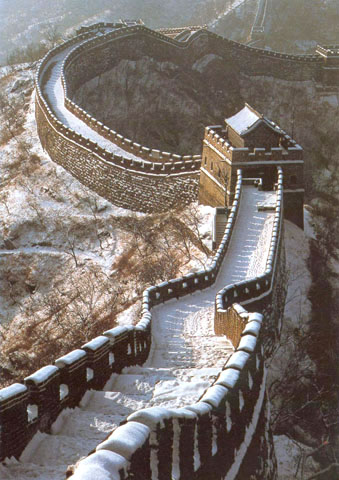
Now imagine you want to use this image of The Great Wall of China in your teaching. Drawing on your notes, come to an agreement in the course forum about the point at which using this material becomes illegal. Could you
- Show it to your students using the classroom whiteboard?
- Make paper copies of it and distribute it to pupils during a classroom exercise?
- Crop it, so that it fits nicely into the school newsletter or website?
Creative Commons
Using material you find on the web has been made easier in recent years through Creative Commons, which provides a system of licensing to enable people to share and re-use information easily.
Play this video from Creative Commons for a brief introduction.
Now look at the Creative Commons licenses, note the increasing degrees of protection they offer for the creators of material, and also what constitutes ‘use’. Note down which of the licenses are the most useful, from your point of view.
Discussion Creative Commons extends and works alongside copyright to enable people to share their work. This works well for us as consumers of information because it expands the amount of information available for us to re-use.
Creative Commons: using Flickr Flickr is a site for sharing photographs. The advanced search options in Flickr enable you to search within Creative Commons licensed content. You can restrict your search according to what you ultimately want to do with what you find. For example, you can search just for images that you can edit. This is a quick and easy way to ensure that you find material quickly which suits your purpose.
- Go to the Flickr website.
- Type ‘digital native’ in the search box. Note down the number of results you get. Click on some of the images, and look under ‘Additional information’ (on the right hand side of the screen to see the licence information, which details what you can legally ‘do’ with the material.
- Now try an ‘Advanced Search’. If you are viewing an individual photograph, you can get to Advanced search by clicking on ‘Search’.
If you are looking at the thumbnails of your search results, the Advanced Search option should be at the top of the screen. Scroll down the Advanced Search screen to find the Creative Commons options. Select the tick box called ‘Only search within Creative Commons licensed content’.
- Do the same search on ‘digital native’. How many items did you find this time? What you can ‘do’ with this material?
Discussion When we did this search, there was a significant difference in the number of hits and what we were able to ‘do’ with the content we found. Restricting the search to only those items licensed under Creative Commons reduced the number of hits from 7000+ to around 1000, and what we could do with the material found was much less restrictive. However, you do need to be careful because of the different sort of Creative Commons licences, most of which do require that you give appropriate attribution for the images you use (e.g. if you are including an image in a presentation you may also have to include the url where you found the image).
Creative Commons: using Google Like Flickr, Google’s advanced search options enable you to filter your results according to what you ultimately want to do with what you find.
- Go to the Google Images website.
- Search for material on a topic of your choosing. Write down the search term that you are going to use.
- Now select ‘Advanced search’. Under ‘Usage rights’, note the range of options in the drop-down menu for restricting your search.
- Carry out the same search (using the same search term) but restricting it to items ‘labeled for reuse’.
Click on a few of the items to look at what you can do with the material.
Discussion Searching in this way is a good idea in two respects – it reduces the number of items you have to deal with and ensures that you get material which you can reuse. For example, when we did this search, using the word ‘fish’, and restricting the results to those ‘labeled for reuse’, we were able to reduce the hits on Google images from over 104 million to a more much manageable 500.
Reviewing your sources When looking for material to use in the classroom, using ‘reliable, high quality’ sites to start with can take some of the guesswork out of finding resources that can be re-used legally. The objective of this course activity is to revisit the sites you normally use, and review them to see whether they are good sources of legal-to-use information.
Go to the sites that you normally use as sources of material. Note down any information about the copyright associated with those sites. To what extent can you legally use material from them? (Adapted from Copyright: keep it legal/Resource, section CopyrightPractical).
Wikis
Learners often need space to share ideas and/or resources, to write together. This section looks at the use of a ‘wiki’ (a website which can be added to and edited by any number of people) for these purposes.
So what is a wiki? A wiki is a website for sharing and developing ideas, materials, plans etc. Any page of the website can be changed by anyone (sometimes usernames and passwords are needed, sometimes edits can be anonymous). Only one person can edit any one page at one time but as soon as they have finished and saved, anyone else can then edit it.
Exploring Wikis Wikis are gaining popularity with teachers who recognise its power as a creative and collaborative tool. Teachers are exploring ways of integrating them into their teaching and learning. Some are sharing examples of pupil work, others are encouraging pupils to contribute to a class wiki.
Wikis are already being used extensively in education, though often for reading rather than writing. Wikipedia is often used as a source of information, for example, and has a specific schools section organised by the subjects of the National Curriculum.
You might like to look at some existing wikis that are used for learning and teaching and share thoughts about how they are being used.
Table 2
| Key stage | Curriculum | What's this wiki about? |
| 1 | Maths | 'Primary Math' has been set up to enable students in Canada to share their maths learning with classes around the world. Students have uploaded images of patterns, numbers and shapes etc |
| 2 | English | 'Terry the Tennis Ball' is a collaborative story developed by students at a primary school in Australia. |
| 2 | Science | 'Sound and Light', a wiki by students, for students, based in the UK. There are examples of student work using a range of media from photos through to audio and video files. |
| 1-2 | English | 'And to think I saw it on my way to school' is a wiki developed by a cluster of schools in America inspired by a Dr Seuss book. There are examples of student work using a range of publishing tools. |
Wiki Structure
Thinking about structure
Wikis, like any other website can have different structures to suit different contexts. These range from a single web page to a series of linked web pages both of which can be edited by individuals or groups of people.
The structure of any wiki used in a learning context may well be derived from the way in which learning is structured in classrooms with groups and tasks represented by different wiki pages. On the other hand the use of a wiki allows for learning and sharing to go on over time, not constrained by ‘the lesson or session’, and to go on over space not constrained by the physical buildings.
The structure of any wiki used in a learning context may well be derived from the way in which learning is structured in classrooms – using groups and tasks to be represented on pages for example. On the other hand the use of a wiki allows for learning and sharing to go on over time, not constrained by ‘the lesson or session’, and to go on over space not strained by the physical buildings.
 Figure 1 Hierarchical, with a main menu page, all can edit any page. Pages maybe organised by activity, topic etc.
 Figure 2 Matrix, all pages link to each other, anyone can edit all pages. Maybe one page per activity, topic etc.
 Figure 3 Groups, with a menu page, only those in the group can edit the group’s pages
 Figure 4 Groups, with a menu page, only those in the group can edit the group’s pages. Individual pupils in their groups have their own pages, with perhaps some where only a single pupil can edit.
By looking at other examples of wikis and seeing what other people are doing and thinking about how to use wikis, you will be able to generate ideas about how you might structure and use a wiki to suit your own context.
Further Reading You might like to look at these further resources
- ‘Collaborative learning the wiki way’ Engström and Jewett (2005) - available Error creating thumbnail: **** Error: An error occurred while reading an XREF table. **** The file has been damaged. This may have been caused **** by a problem while converting or transfering the file. **** Ghostscript will attempt to recover the data. **** However, the output may be incorrect. Requested FirstPage is greater than the number of pages in the file: 0 No pages will be processed (FirstPage > LastPage). convert: no decode delegate for this image format `' @ error/constitute.c/ReadImage/565. convert: no images defined `/tmp/transform_1db68caefdc1.jpg' @ error/convert.c/ConvertImageCommand/3258.
- ‘The potential of wikis in the classroom’ Fountain (2005) - available File:The potential of wikis in the classroom.doc
- ‘The good, the bad and the wiki’ Wheeler, Yeomans and Wheeler (2008) - available File:The good, the bad and the wiki.doc
- ‘A five stage model for the use of a wiki’ Wheeler (2008) - available File:A five stage model for the use of a wiki.doc.
You might also want to explore the VITAL resources on wikis. (Adapted from Sharing ideas - developing wikis (primary)/Resource, section Whole).
In 2008, Becta published the results of a study of the use of Web 2.0 tools in Key Stage 3 and 4 classrooms. You can access this report  , or in editable (.doc) format File:Becta report.doc. This is a lengthy report covering all aspects of Web 2.0 tools (including social networking and blogging) but there are some sections that focus on the use of wikis.Go to page 20 of the report for statistics relating to teacher perceptions of wikis and experiences of their use in the classroom. Reflect on the final bullet point that relates to use of wikis and their management. Think about whether wiki management could be an issue for you and your learners and how you might deal with this, for example, creating wikis for smaller groups and introducing a code of conduct. Add to your notes from the previous activities any further thoughts arising from your reading.
Go to page 34 and read the section that considers the issues of private versus collaborative learning. An important point is made here about some learners who prefer their own private space for learning and therefore find it difficult to engage in collaborative activities. Reflect on whether any of your learners may have this preference and could find collaboration through a wiki to be difficult. Could you encourage such learners to become involved by careful selection of a small group of students to work on a wiki-based activity? Again, add any thoughts you have to your notes. (Adapted from Learning together introducing wikis/Resource, section BECTA).