OER4Schools/Introduction to Assessment for Learning: Difference between revisions
JanetBlair (talk | contribs) m (removed the . after Dr) |
|||
| (16 intermediate revisions by 3 users not shown) | |||
| Line 6: | Line 6: | ||
{{OER4SchoolsWSInfo | {{OER4SchoolsWSInfo | ||
|intention={{ OER4SchoolsWSInfo/intention intro}} | |intention={{ OER4SchoolsWSInfo/intention intro}} | ||
* using an assessment inventory as a self-assessment measure | * using an '''assessment inventory''' as a self-assessment measure | ||
* using Traffic Lights as a tool in AfL | * using Traffic Lights as a tool in AfL | ||
* the concept of ‘Assessment’ vs ‘Assessment for Learning’ | * the concept of ‘Assessment’ vs ‘Assessment for Learning’ | ||
* the | * '''Assessment for Learning''' as the process of seeking and interpreting '''evidence''' for use by learners and their teachers to decide: | ||
**where the learners are in their learning, | |||
**where they need to go next, | |||
**and how best to get there. | |||
|success criteria={{ OER4SchoolsWSInfo/criteria intro}} | |success criteria={{ OER4SchoolsWSInfo/criteria intro}} | ||
* keep a record of the assessment methods that you have | * keep a record of the assessment methods that you have used on your assessment inventory | ||
* come up with ways that Traffic Lights can be used to help with the review of progress that is part of AfL | * come up with ways that Traffic Lights can be used to help with the review of progress that is part of AfL | ||
* watch an introductory video on AfL and draw out the important points for discussion | * watch an introductory video on AfL and draw out the important points for discussion | ||
* watch a powerpoint presentation on AfL, pausing for reflection and to think about how interactive teaching techniques can help with the application of AfL in the classroom | * watch a powerpoint presentation on AfL, pausing for reflection and to think about how interactive teaching techniques can help with the application of AfL in the classroom | ||
|ict= | |ict=In this session you will continue consolidating the ICT skills you have learnt so far, and apply them in the classroom. You will be able to apply AfL techniques in conjunction with ICT classroom use as well. | ||
}} | }} | ||
| Line 31: | Line 31: | ||
[[File:My assessment inventory.jpeg|900px]] | [[File:My assessment inventory.jpeg|900px]] | ||
{{activity|ia|: Working on your assessment inventory|10}} Complete the assessment inventory {{File|My assessment inventory.doc}}. | {{activity|ia|: Working on your assessment inventory|10}} Complete the assessment inventory {{File|My assessment inventory.doc}}. You can use this to keep track of the assessment methods that you have used (old and new). Each week as you encounter new methods you can add them to the inventory. | ||
*First fill in your name next to the title then add the date in the first row. | |||
*Next describe your current understanding of assessment by identifying different kinds or elements of assessment that you know about. | |||
*Lastly record the assessment measures that you have used in your classroom to assess the student's progress e.g. do you give them a test/ask them questions and record how they have answered/give them homework and assess how well they have done it etc? Please take care that you mention only the measures that you '''have used''' yourself and not the measures that you know of but have not tried. | |||
By completing another row at the beginning of each session on Assessment for Learning you can assess your own progress as the workshops proceed. As well as adding assessment methods (e.g. Traffic Lights) you can also add any new learning on assessment that the workshop sessions have highlighted. | |||
{{ednote|text= | {{ednote|text= | ||
Orally repeat the guidelines given above regarding the sequence of filling up the inventory. Emphasise that only the assessment measures that participants have used should be recorded. | Orally repeat the guidelines given above regarding the sequence of filling up the inventory. Emphasise that only the assessment measures that participants have used to assess their students should be recorded. | ||
Remind the participants to bring the inventory to every session on assessment. | Remind the participants to bring the inventory to every session on assessment. | ||
| Line 44: | Line 48: | ||
Unit 4 is about ‘Assessment for Learning’ and not simply about ‘Assessment’. Before we proceed to understanding more about Assessment for Learning (AfL), let use our Traffic Lights. | Unit 4 is about ‘Assessment for Learning’ and not simply about ‘Assessment’. Before we proceed to understanding more about Assessment for Learning (AfL), let's use our Traffic Lights. | ||
| Line 62: | Line 66: | ||
{{ednote|text= | {{ednote|text= | ||
Reinforce that when Traffic Lights are displayed the teacher can see at a glance those students that need help. | Reinforce that when Traffic Lights are displayed the teacher can see at a glance those students that need help. The Traffic Lights can be used while students are engaged in a task to indicate their progress. The teacher may need to gently remind students to display theirs by saying something like "remember to display your Traffic Light', "has everyone displayed their Traffic Light?", 'have a look around and make sure that everyone has displayed their Traffic Light" etc. | ||
If the number of participants is 10 or less, make a note of the Traffic Light colour of each participant on a flip chart. You can prepare the flip chart with the participants’ names listed on it, in advance. | If the number of participants is 10 or less, make a note of the Traffic Light colour of each participant on a flip chart. You can prepare the flip chart with the participants’ names listed on it, in advance. | ||
| Line 91: | Line 95: | ||
{{activity|wcd|: Proposed activity for covering the information on page 3 of the VVOB handout (for slide 8)|5}}. | {{activity|wcd|: Proposed activity for covering the information on page 3 of the VVOB handout (for slide 8)|5}}. | ||
There are 14 short points for participants to get their | There are 14 short points for participants to get their heads around. These could be divided up amongst the group, so one point each or one between two depending on the group size. Participants should read and understand their point, perhaps coming up with an example to help clarify it to the rest of the group. After allowing participants a few minutes to understand their point, ask them in turn to stand up and explain it to the rest of the group. By the end of this activity the participants will have verbally presented the content in a way that should make the material easily accessible and easier to remember. | ||
| Line 121: | Line 125: | ||
= {{Name for ICT practice with dtgw}} = | = {{Name for ICT practice with dtgw}} = | ||
{{:OER4Schools/ICT/include}} | |||
{{ | |||
= {{Name for connecting with overarching goals}} = | = {{Name for connecting with overarching goals}} = | ||
Latest revision as of 15:25, 6 March 2014

The OER4Schools Professional Learning Resource
Learning intentions and objectives.
In this session you will learn about:
- using an assessment inventory as a self-assessment measure
- using Traffic Lights as a tool in AfL
- the concept of ‘Assessment’ vs ‘Assessment for Learning’
- Assessment for Learning as the process of seeking and interpreting evidence for use by learners and their teachers to decide:
- where the learners are in their learning,
- where they need to go next,
- and how best to get there.
Success criteria.
To meet the learning intentions you will:
- keep a record of the assessment methods that you have used on your assessment inventory
- come up with ways that Traffic Lights can be used to help with the review of progress that is part of AfL
- watch an introductory video on AfL and draw out the important points for discussion
- watch a powerpoint presentation on AfL, pausing for reflection and to think about how interactive teaching techniques can help with the application of AfL in the classroom
ICT components.
In this session you will continue consolidating the ICT skills you have learnt so far, and apply them in the classroom. You will be able to apply AfL techniques in conjunction with ICT classroom use as well.
Review of follow-up activities from last session
If you are running a professional learning programme which follows these sessions in sequence, then you should do the review of follow-up activities relating to the previous session (More on questioning). The 'review of follow-up activities' for that session is available here, and also shown below in the session text. However, if you are following selected sessions in a different order, then you should use the reflection appropriate to the previous session you did.
The review of the follow-up activities for this session (to be done at the start of the next session) is available here.
 Review (10 min) of the planned activity, other strategies, and peer observation.
- Did you observe a buddy practising questioning in their classroom? Did your observation help your buddy? If yes, elaborate with specific examples about the changes in your buddy’s questioning after the activity. (You might want to continue the observation activity for a few more weeks)
- What did you learn by observing your buddy? Were there any questioning and handling responses strategies that you learned from your buddy?
- Did you notice any changes in pupils’ participation due to your new questioning and handling responses strategies? Share one strategy that you found most effective in your classroom. Explain reasons for why you think that the strategy was effective.
- Did you try any strategies for improving the quality of pupils’ responses? Which strategy or strategies led to chains of thinking about the content that you were teaching?
Review (10 min) of netbook based activities in the classroom.
- ICT activity – did you use the netbooks during the last week for the geogebra activity?
- Did you try anything else?
- How familiar are your students with using the netbooks?
- How familiar are you with using the netbooks?
My assessment inventory

Individual activity (10 min): Working on your assessment inventory Complete the assessment inventory My assessment inventory.doc (info). You can use this to keep track of the assessment methods that you have used (old and new). Each week as you encounter new methods you can add them to the inventory.
- First fill in your name next to the title then add the date in the first row.
- Next describe your current understanding of assessment by identifying different kinds or elements of assessment that you know about.
- Lastly record the assessment measures that you have used in your classroom to assess the student's progress e.g. do you give them a test/ask them questions and record how they have answered/give them homework and assess how well they have done it etc? Please take care that you mention only the measures that you have used yourself and not the measures that you know of but have not tried.
By completing another row at the beginning of each session on Assessment for Learning you can assess your own progress as the workshops proceed. As well as adding assessment methods (e.g. Traffic Lights) you can also add any new learning on assessment that the workshop sessions have highlighted.
Orally repeat the guidelines given above regarding the sequence of filling up the inventory. Emphasise that only the assessment measures that participants have used to assess their students should be recorded.
Remind the participants to bring the inventory to every session on assessment.
Traffic Lights
Unit 4 is about ‘Assessment for Learning’ and not simply about ‘Assessment’. Before we proceed to understanding more about Assessment for Learning (AfL), let's use our Traffic Lights.
We have already used the Traffic Lights (robots) in the ICT practice, to indicate our own progress in these activities. Can you see in the photo here that the students are displaying a green card on their desk - indicating that they know what they are supposed to be doing?

Let's do another quick exercise.
Whole class dialogue (10 min): Whole Group discussion about Traffic Lights. What do you know about ‘Assessment for Learning’ at this stage? Show by holding up or putting forward on the table your Traffic Light.
Now discuss:
- What are the different ways in which I can use Traffic Lights in my classroom?
- In what ways can I respond to each colour of the Traffic Light?
- When is it appropriate for students to respond instead of me? What are the pros and cons of that?
Reinforce that when Traffic Lights are displayed the teacher can see at a glance those students that need help. The Traffic Lights can be used while students are engaged in a task to indicate their progress. The teacher may need to gently remind students to display theirs by saying something like "remember to display your Traffic Light', "has everyone displayed their Traffic Light?", 'have a look around and make sure that everyone has displayed their Traffic Light" etc.
If the number of participants is 10 or less, make a note of the Traffic Light colour of each participant on a flip chart. You can prepare the flip chart with the participants’ names listed on it, in advance.
Introducing Assessment for Learning (AfL)
Observing, thinking, reflecting (5 min): Watching a video on formative assessment. Watch 2 segments of this video, bearing in mind these questions for reflection:
- How is the concept of AfL different from the commonly known notion of assessment?
- What are some of the elements of AfL that have been mentioned in the video?
- Which element(s) of AfL did you find most interesting? Why?
VIDEO
Shirley Clarke video on feedback
0:00 - 0.56 (introduction to AfL), 4.38 - end (example of 10-year-olds doing peer assessment) In this video, Shirley Clarke explains the concept of ‘Assessment for Learning’ and its elements in brief. Some elements can also be seen in action.
Video/Formative Assessment in Schools.mp4, https://oer.opendeved.net/wiki/Video/Formative_Assessment_in_Schools.mp4,This video is available on your memory stick in the video/Video from other organisations folder. Duration: 8:19 watch on YouTube, local play / download options / download from dropbox)(Series: Video from other organisations, episode N/A)
Draw out the idea that AfL is about constantly reviewing ones progress rather than being tested on learning at the end of a piece of work. Feedback from peers is an important part of this review process. Also, it is easier to review progress if it is clear what is expected, that's where using success criteria can help.
Whole class dialogue (10 min): Discussion on the questions. Discuss the above questions for reflection.
Understanding ‘Assessment’ and ‘Assessment for Learning’

Observing, thinking, reflecting (15 min): Watching a powerpoint presentation on AfL.
By now, you will have already discussed some of the points that will arise on this PowerPoint. Do a mental assessment to see if your understanding of assessment and AfL advances by watching the PowerPoint (File:Unit 4.1 AfL.ppt).
Whole class dialogue (5 min): Proposed activity for covering the information on page 3 of the VVOB handout (for slide 8).
There are 14 short points for participants to get their heads around. These could be divided up amongst the group, so one point each or one between two depending on the group size. Participants should read and understand their point, perhaps coming up with an example to help clarify it to the rest of the group. After allowing participants a few minutes to understand their point, ask them in turn to stand up and explain it to the rest of the group. By the end of this activity the participants will have verbally presented the content in a way that should make the material easily accessible and easier to remember.
Play the slideshow of the Power Point ‘File:Unit 4.1 AfL.ppt’. Read aloud the contents of the slides if you think it will help the participants.
During slide 8, tell participants that AfL strategies are in yellow ellipses (it is the image at the beginning of this section).
During slide 11, ask participants to read (or to keep reading to a minimum you could do the proposed activity) of the VVOB handout called ‘Questioning the Questions’ 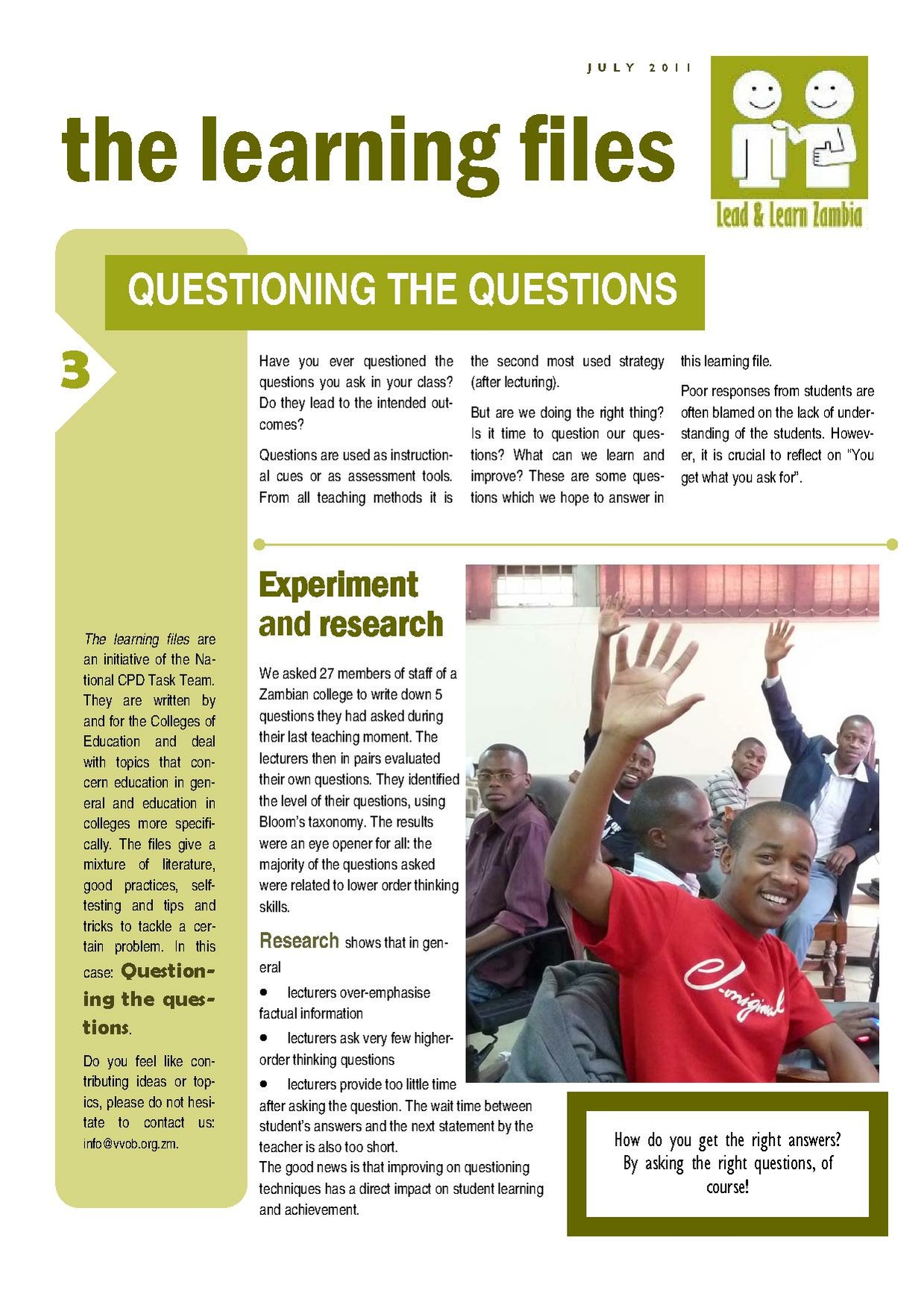 that was distributed during Unit 2 Session 2, as a homework task. We will do another activity later that is designed to cover the material on pages 4-6.
During slide 12 titled ‘Self-assessment’, ask the participants to show their understanding about assessment and AfL on their Traffic Lights. Then take the following steps:
- If anybody shows ‘orange light’ or ‘red light’, ask them the specific topic to which they are referring.
- Then ask other participants who have shown ‘green light’ to explain the topic to their peers.
- If doubts are still not resolved, record the topic and include it in your feedback about the session. Assure participants that you will get back with more information.
Remember the AfL strategies will be discussed in the upcoming sessions. So if doubts are about the strategies, inform the participants that the future sessions will cover them.
If you had prepared a flip chart with the traffic light of each participant before the activity, record their current light. You can also ask the participants to come up and write their current traffic light. This will help them to see their own progress.
Whole class dialogue (15 min): Whole group reflection on the AfL powerpoint. Questions for reflection on PowerPoint
- What steps, do you anticipate, you will have to take to implement AfL in your classrooms?
- What issues do you think will arise in implementing AfL in your classrooms? Discuss ways of resolving them with your peers.
- Are there any current practices which are useful or can become useful for AfL with some modifications? For example, current practice of marking notebooks can include qualitative feedback. Discuss these practices, the modifications and their use for AfL with examples.
- Do you think ‘Traffic Lights’ is a useful strategy for AfL? Why? (Tips: targeted help, self-assessment etc)
- How would you respond to each colour when using Traffic Lights in your classroom?
ICT practice: Different-tasks group work with ICT and activity planning
Different-tasks group work (20 min) on becoming an expert. You have looked at various ICTs now, including:
- finding and using images
- slideshows
- the browser
- GeoGebra
- spreadsheets
- EtherPad for collaborative writing and concept mapping
You should also be able to type more comfortably now. You should be able to develop ICT ideas that support subject learning in the classroom. You may have found that you have a particular interest in a particular application, or the particular use of an application. In this Unit, you can choose one application and deepen your knowledge.
Throughout this unit, you will have an opportunity to deepen your skills in that application. Have a brief brainstorm as a group about the different ICT skills that you have developed and see who would like to deepen which skills. Ideally as a group you will be able to cover all of the ICTs that we have looked at so far and develop experts for each application. Divide into pairs and think about what you might do for the next few sessions. Which application would you like to become more proficient in using? Is there a particular idea that you would like to work on using this application? Is there a particular project that you would like to develop using it? This is your opportunity to become an expert. As you proceed along the next few sessions, make notes about the things that you are exploring with your chosen application. In the last session of this Unit, you will be able to present this.
Connecting with overarching goals of the programme
Open space (10 min). It's now time for the "open space", that gives you an opportunity to discuss issues that have arisen, and to relate those to the broader context of the programme. Do not just gloss over this section, but make time to raise issues, and probe the progress that you are making. You could use this space to:
- Remind yourselves of the of the Most Significant Change Technique, and e.g. collect more of your stories.
- Discuss your assessment portfolios: Is there anything that you are unsure about? Is it going well? What could be done better?
- Check on the work with the classroom assistants: Is this going well? Are there any tensions? Any observations or tips you can share?
- Reviewing individual ICT practise (such as typing practise).
- If you are preparing a presentation for other teachers, you could work on the presentation (about what you have been learning, stories emerging from MSC).
- Remind those who are doing audio diaries, to upload them.
- You could discuss any other issues that have arisen.
You will find notes and summaries of various techniques and concepts on our reference page, and you might want to refer to those for clarification during this activity if needed.
Follow-up activities
Agreeing follow-up activities (5 min).
Part A: My Assessment Inventory is available electronically (My assessment inventory.doc (info)). Type the answers that you have written on paper, on this electronic version. As soon as you download the inventory, first save it with a new filename, which includes your name. For instance, if your name is “Esther Phiri”, save the document with the name “My assessment inventory - Esther Phiri.doc”. Save the document to your ‘files area’ on the desktop, so that it will get copied to the server. Remember to bring the paper inventory for every session and fill up the electronic inventory every week, from now on.
Part B: Try Traffic Lights as a part of one or more teaching lessons. You could employ the help of classroom assistants (from your own or another class) to resolve the doubts of ‘red lights’ and ‘orange lights’; for example those with ‘green lights’ could then help their peers? Record your experience of using Traffic Lights and your students’ responses on the dictaphone.
Part C: Consider watching the video clip and the Powerpoint presentation together again during the week. This will help you in understanding the concept of AfL by seeing some examples from real classrooms.
In the next session, these follow-up activities will be reviewed. If you are using this session on its own, you can have a look at the review of follow-up activities here.
Acknowledgements
We are very grateful to:
- Dr Sue Swaffield, Senior Lecturer in Educational Leadership and School Improvement at Faculty of Education, University of Cambridge for suggestions and permission to use some of her slides in the Power Point presentation;
- Dr Shirley Clarke, for permission to use clips from her DVD 'The Power of Formative Assessment' for the session;
- Northern Ireland Council for the Curriculum, Examinations and Assessment, for permission to use their document 'CCEA: Afl Guidance KS 1-2 – 2007' in developing the session.
References
Assessment Reform Group (2002) Assessment for Learning: 10 Principles. Cambridge: University of Cambridge School of Education.
Criticos, C., Long, R., Moletsane, R., Mthiyane, N., & Mays, T. (2009). Getting practical about classroom-based teaching for the National Curriculum Statement. South Africa: Oxford University Press.
At the end of each session, we provide an overview of the activities in this session, together with their suggested timings. Although this appears at the end of the session (for technical reasons), you should keep an eye on this throughout the session, to make sure that you are pacing the workshop session appropriately!
Total time: 125 (min)
Activities in this session:
- Review (10 min) of the planned activity, other strategies, and peer observation.
- Review (10 min) of netbook based activities in the classroom.
- Individual activity (10 min): Working on your assessment inventory
- Whole class dialogue (10 min): Whole Group discussion about Traffic Lights.
- Observing, thinking, reflecting (5 min): Watching a video on formative assessment.
- Whole class dialogue (10 min): Discussion on the questions.
- Observing, thinking, reflecting (15 min): Watching a powerpoint presentation on AfL.
- Whole class dialogue (5 min): Proposed activity for covering the information on page 3 of the VVOB handout (for slide 8)
- Whole class dialogue (15 min): Whole group reflection on the AfL powerpoint.
- Different-tasks group work (20 min) on becoming an expert.
- Open space(10 min).
- Agreeing follow-up activities(5 min).
If you have printed this session for offline use, you may also need to download the following assets:
- My assessment inventory.doc
- Video/Formative Assessment in Schools.mp4 (local play / download options / download from dropbox)
- My assessment inventory.doc


